

Punjab Vehicle Registration: How to Download Your e-Registration Card (ERD) in 2026
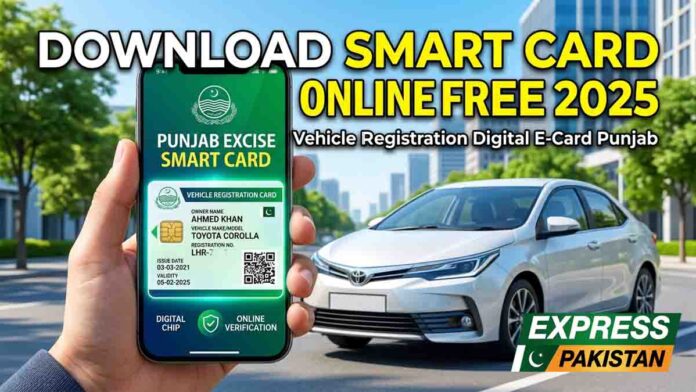
The Government of Punjab has officially revolutionized vehicle documentation. We have moved from the era of “registration books” to a modern, dual-layer system featuring the physical Chip-based Smart Card and the digital e-Registration Card (ERD).
Whether you are waiting for your physical card to arrive by mail or simply prefer a paperless wallet, the ERD is your official, legally recognized proof of ownership. This guide provides the most up-to-date steps to access your vehicle details instantly.
Smart Card vs. e-Registration Card (ERD): Know the Difference
It is a common misconception that you “download” a smart card. In 2026, the system produces two distinct documents:
- Physical Smart Card: A plastic, chip-based card issued via NADRA. It costs 530 PKR and is sent to your registered address within 7–30 days.
- e-Registration Card (ERD): A digital PDF certificate available for instant download. It features a dynamic QR code that Punjab Traffic Police scan to verify your tax and registration status.
Legal Status: Under current Punjab law, presenting the digital ERD on your smartphone is 100% equivalent to showing the physical card at any checkpoint.
The 2026 Biometric Revolution: The PAK-ID App
As of February 2026, the Excise Department has integrated with NADRA’s PAK-ID App. This is a major update for transparency:
- Biometric Verification: All transfers and new registrations now require Face ID or fingerprint verification through the PAK-ID app.
- Instant Sync: Your ERD becomes available for download as soon as your biometric verification is “Passed” in the system.
- Overseas Access: Overseas Pakistanis can now verify vehicle ownership without visiting an embassy, using the app’s Face ID feature.
Step-by-Step: How to Download Your ERD
Method 1: The Official Excise Portal (Web)
Visit the Official Excise, Taxation & Narcotics Control Department website.
Select the “E-Registration Card” tab on the dashboard.
Enter your Vehicle Registration Number (e.g., LEC-26-1234).
Input the full Chassis Number (found on your vehicle’s invoice or engine plate).
Click “Search” and then select “Download ERD” to save the PDF.
Method 2: The e-Pay Punjab App (Mobile)
- Download mobile app
- e-Pay Punjab for android or apple app store or Excise & Taxation app for android or apple app store
- Open the e-Pay Punjab or Excise & Taxation app.
- Log in with your CNIC.
- Tap on “My Vehicles.”
- Your registered vehicles will appear automatically. Select the vehicle and tap “Download Virtual Card.”
Verification and Tracking via MTMIS
If you need to verify a vehicle’s history or track a physical card’s delivery, the Motor Transport Management Information System (MTMIS) is your primary tool.
- Verification: Visit mtmis.excise.punjab.gov.pk to check the owner’s name, vehicle color, and tax status.
- Tracking: Use the “Track Return Shipment” link on the MTMIS homepage to see if your physical smart card is “In-Printing,” “Dispatched,” or “Delivered.”
Feature Comparison: Physical vs. Digital
| Feature | Physical Smart Card | e-Registration Card (ERD) |
| Format | Plastic with Electronic Chip | Downloadable PDF |
| Price | 530 PKR | Free |
| Wait Time | 7–30 Days (Postal) | Instant |
| Verification | Chip / QR Scan | QR Scan |
| Accessibility | Physical Wallet | Smartphone / Cloud |
Expert Troubleshooting
- “Record Not Found”: This usually occurs if the vehicle was recently transferred. Wait 48 hours for the NADRA database to sync with the Excise portal.
- Chassis Number Errors: Ensure you are entering the entire chassis number, not just the last 6 digits, as the portal security was tightened in 2025.
- Browser Cache: If the PDF fails to download, try clearing your browser cache or switching to the Google Chrome app, as some built-in mobile browsers block automated PDF pop-ups.
Editor’s Tip: Always keep a screenshot of your ERD in a dedicated “Documents” folder on your phone. This ensures you can show it to authorities even in areas with zero mobile data coverage.
FAQs
Is the ERD free?
Yes. While you pay for the physical card registration, the digital ERD is a free supplementary service.
Can I use the ERD outside of Punjab?
While Punjab authorities fully accept it, if you are traveling to Sindh or KPK, it is safer to carry your physical card or a certified copy of the vehicle’s file.
What if my MTMIS details are incorrect?
You must visit your local Excise Office with your original documents and biometric receipt to request a data correction.
Conclusion
The transition to the e-Registration Card (ERD) and the PAK-ID biometric system has made vehicle ownership in Punjab more secure than ever. Don’t wait until a roadside check to find your documents—download your ERD today and enjoy the peace of mind that comes with digital registration.
Ready to start? Head over to the MTMIS portal now to verify your vehicle’s status!